AM1 and AM3 - Auto-Magic filter for digital Compact cameras.
The AM is a 50x50mm sheet of Auto-Magic filter, sold either as a single sheet (AM1) or as a three pack (AM3). Given the massive variety of digital compact cameras being used on underwater, we offer this single size of filter for the photographer to trim and fix to their lens. See this page for more details on how to cut and fix the filter. Depending on the size of the lens on your camera you will get between one and four filters per sheet. It can be cut and mounted like this:
Please note that the Auto-Magic filter is also available as a solid filter for external mounting on your underwater camera.
We made three recipes of filter for digital compact cameras. This filter, the AM - Auto-Magic, is the main one and is designed for use in blue to blue-green waters. Unlike our other filters this filter is designed to work with the auto white balancing (default) setting on your digital compact camera to make great colour underwater photography point and shoot simple. However, if you are happy with the proceedure of setting the white balance manually, then we suggest you do as this will give you more control over your images. Most users start using this filter in fully auto mode and then switch over to using it manually after a few dives.
If you dive in green water - you may also like to try the GreenWater Magic. - the GWCM, which also requires the photographer to set the White Balance manually.
A single AM1 costs £22 and a pack of three filters (AM3) costs £35.
Magic filters are designed for available light underwater photography. The Auto-Magic works best from the 3m down to 12m (40ft), but with more modern compact cameras can work considerably deeper. All our gel filters are optical quality polyester gels, manufactured for us, to our recipes, by one of the world's leading filter companies. All Magic filters are supplied with detailed instructions.
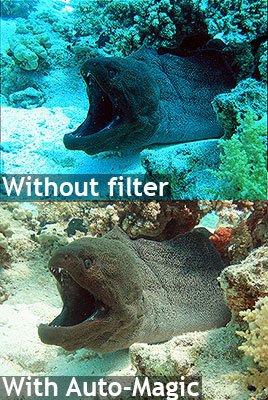
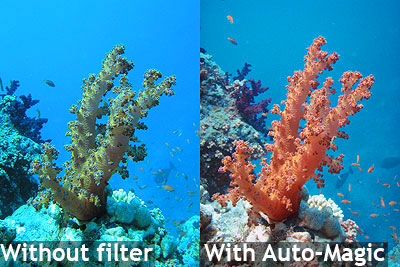
Sample before and after photos with the AM1 on a digital compact camera.
Both before and after taken on auto exposure and auto white balance: